Run multiple AI coding agents in parallel
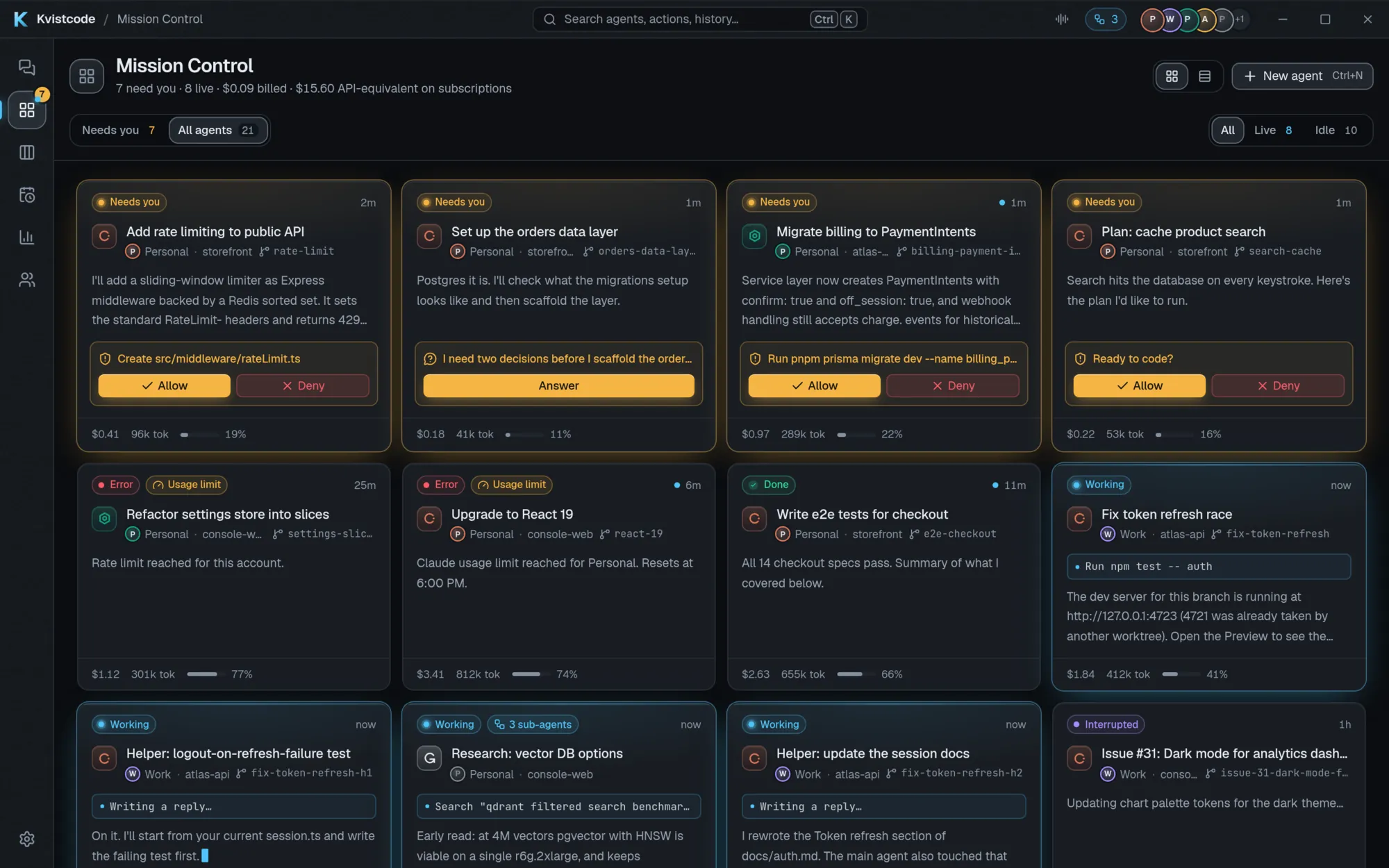
One agent at a time leaves you waiting. Several at once leave you juggling terminals, logins and half-finished branches. Kvistcode is built for the second case: every agent gets its own worktree, and one screen shows who is working, who is stuck and who needs you.
Why parallel agents get messy
Coding agents are most useful when you can run several at once, but the tooling fights you. Each vendor ships its own terminal UI, its own login and its own idea of a session. Two agents pointed at the same working copy overwrite each other’s files. And an agent that is waiting for your approval looks exactly like one that is still thinking, so it can sit blocked for an hour.
How Kvistcode keeps agents apart
- Many agents per project. Start up to 8 on the same task. They open together as full conversations in a grid that fits the window, each in its own worktree.
- One worktree per agent. Every agent gets its own branch and working copy, so parallel work does not collide. Here is how worktrees work.
- Mission Control. A live grid or list of the whole fleet, with filters and Allow and Deny buttons right on the cards. Try the interactive demo.
- Needs you. One queue for every pending approval, question, error, spending hold and finished task, with keyboard triage (
J/K/E). PressCtrl/Cmd+Jto jump to the next agent that needs you, and what needs you also stays pinned above the message box. - Notifications. Sounds the moment an agent needs you, Approve and Deny inside the notification on Linux, a phone push via ntfy, alerts to Slack, Discord or any webhook, and a re-ping when an approval goes stale.
- Agents that survive. Closing the window keeps Kvistcode in the tray, and agents survive crashes and reboots and can be resumed.
- A queue for your messages. Messages typed while an agent is busy run in order, and you can edit, drop or send one right now.
Mix providers in one fleet
Run Claude Code on a refactor, Codex on the tests and Grok on the docs, all in the same window. Compare mode sends one prompt to several providers so you can read the answers side by side and keep the one you like, and Handoff lets one agent review another’s work (“have Codex review Claude’s work”). Local models through Ollama or LM Studio sit in the same fleet. See the local agent guide.
Stay inside your limits
Every account has its own usage meter, where the provider reports one, and the Usage page shows them together. You can sign in to several accounts per provider, and optional rate-limit failover continues a task on another signed-in account when one runs out. It is off by default and can ask first.
Spending limits work per agent, per project or per day, in dollars or tokens. When one is reached the agent finishes its turn instead of being cut off, then waits for you in Needs you: raise the limit, continue once, or stop.
Practical tips for running agents in parallel
- Give each agent work that touches a different part of the codebase. Separate worktrees stop the agents overwriting each other, but two agents changing the same lines will still conflict when you merge.
- Keep tasks small enough to review in one sitting. A diff you can read is a diff you can trust.
- Review before anything lands. Commit, merge and PR are one click from the end-of-turn summary, so it is easy to skip the diff. Do not.
- Use checkpoints freely. If an agent goes off course, restore to the message before it did.
- Put recurring chores on a schedule (“every weekday at 9:00, check for dependency updates”) instead of babysitting them.
Frequently asked questions
How many agents can I run at once?
Do parallel agents conflict with each other?
Can I run different providers at once?
Do agents keep running if I close the window?
Can I check on my agents from my phone?
Take the helm.
Free, open source, and yours. Windows, macOS and Linux.